How Computers and the Internet Actually Work: From Bone Counters to Subsea Cables
From 20,000-year-old bone tallies and Babbage’s mechanical gears to von Neumann architecture, binary logic, subsea fiber-optic cables, and the societal traps of the modern attention economy.
Contents
12 sectionsBeyond the Rectangular Box: What a Computer Actually Is
Among all the inventions in human history that brought human civilization to where it is today, the computer stands at the very pinnacle. Education, healthcare, services, communication, commerce—there is scarcely an aspect of modern life that computers have not reshaped. Today, imagining most of our daily work without computers and the internet is practically impossible, because everything runs on data and information. And for processing data, nothing can substitute a computer. It is a wonder of modern science. Another revolutionary breakthrough was connecting these computers together so they could communicate with one another—which is the internet. In today's digital, information-driven age, where everything has become digital and tech literacy is essential, having a clear conceptual understanding of these technologies is indispensable. Moreover, mobile computing has become an indirect limb of our bodies. The internet has gathered the world's reservoir of human knowledge and placed it right inside our palms. If we do not develop a clear understanding of how this technology actually works, we will fall behind or find ourselves vulnerable to countless digital pitfalls.
Whenever someone thinks of a computer, an image immediately flashes before their eyes: a rectangular box, a monitor, a keyboard, and a mouse. Many people assume a computer is just a desktop or a laptop. But the concept of a computer is far broader than that. Any device that operates digitally or is controlled by a microprocessor is fundamentally a computer—such as mobile phones, televisions, pocket calculators, digital watches, and more. Originally, computers were invented solely to carry out mechanical mathematical calculations; over time, they advanced into universal machines for analyzing and processing information.
History: A 20,000-Year Arc from Counting Bones to Modern Computing
Carved bone with prime-number notches — earliest counting artifact.
Bead-and-rod mechanical calculator. Used continuously for 5,000 years.
First mechanical adding machine with carry propagation across gears.
Four-operation calculator. Leibniz also formally described binary here.
First stored-program concept. Ada Lovelace wrote its first algorithm.
Electromechanical card sorting for the US Census. Seeded IBM.
Mathematical model proving any algorithm can be computed.
Microscopic solid-state switch replaced hot vacuum tubes, enabling miniaturisation.
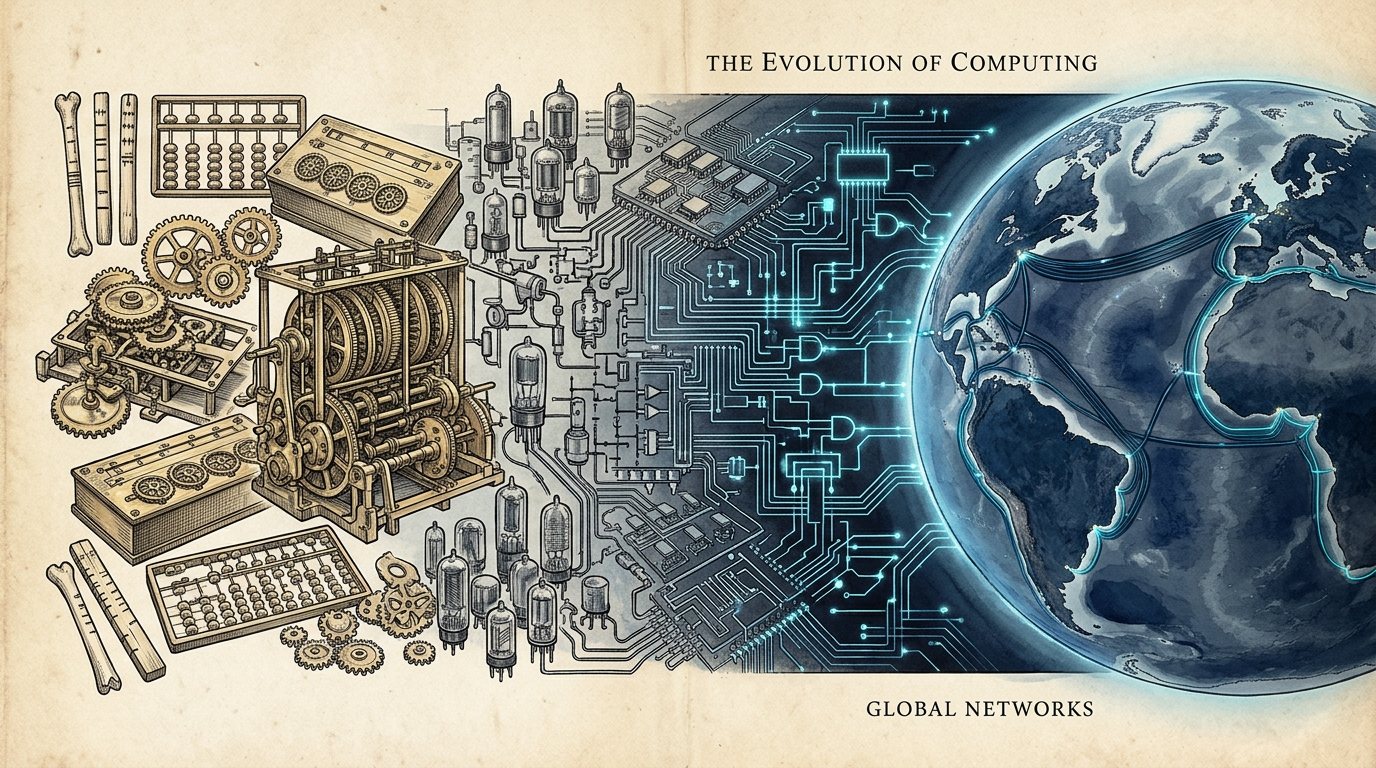
Whenever we want to understand any subject deeply, we are often confronted with something many find dry: "History." Yet understanding where something originated, and appreciating the sweat, intellect, and sheer perseverance of the people behind it, is essential. It is what inspires us. Furthermore, to understand where a technology is heading, you have to analyze its past—nobody wants an uncertain future. The computer was born to count, which is why in Bengali it is called a Gonok-jontro (calculating instrument). Since ancient times, human survival has been deeply intertwined with counting and measuring. When early humans hunted, they tracked the positions of stars across the sky to gauge distance, observed the sun to determine day and night, and measured rations of food. In agricultural societies, humans had to count seed stocks, crop yields, domesticated herds, survey boundaries of land, build stable shelters, and calculate the right seasonal timing for planting. Today, almost everything in our lives depends on arithmetic and math—from crafting a simple chair or table to launching a satellite into deep space. Every single day, we must process raw data into actionable information. Humans always seek ways to accomplish tasks with less physical labor and time. To make work easier, humans turned counting into a mechanized process. One of the oldest archaeological artifacts of this effort is a 20,000-year-old instrument: the Ishango Bone, discovered near Uganda and the Congo, whose notched markings demonstrate an intentional grasp of grouping, intervals, and prime numbers.
In 3000 BCE, the first widely successful counting apparatus appeared: the Chinese Abacus. In 1642, French mathematician and scientist Blaise Pascal transformed the abacus concept by building a mechanical gear-based machine capable of addition—the Pascaline. In 1694, German mathematician and philosopher Gottfried Wilhelm Leibniz built the "Stepped Reckoner," a mechanical computer that could perform all four basic arithmetic operations: addition, subtraction, multiplication, and division. Crucially, Leibniz also formulated the binary numeral system—the foundational numbering system that modern electronic computers rely on today.
In 1821, the recognized father of computing, Charles Babbage, built a mechanical calculating machine called the Difference Engine. Later, he initiated work on the Analytical Engine, designed to be a general-purpose, universal computing machine. Babbage designed this engine to perform any calculation by feeding it instructions from the outside. These instructions were called a program. Society at the time struggled to grasp his vision, and due to funding constraints and the mechanical limits of his era, Babbage could never fully complete the machine during his lifetime. Nevertheless, his blueprint—dividing the machine into an arithmetic Mill (processor), a Store (memory), and input/output mechanisms—remains the fundamental architecture of modern computers. Working alongside Babbage, Lord Byron's daughter, mathematician Ada Lovelace, realized that if the Analytical Engine could manipulate numerical symbols, it could also manipulate musical notes, language, and logical relationships. She wrote the first documented algorithm to calculate Bernoulli numbers on Babbage's engine, making her the world's very first computer programmer.
Decades later, inspired by Babbage's concepts, American scientist Herman Hollerith built an electromechanical punched-card tabulator, which was remarkably successful in processing the US Census. Thin cardstock with punched holes completed electrical circuits to automate tabulations. Hollerith's enterprise later merged with others to become IBM.
In 1847, George Boole invented Boolean Algebra, which later became the operational foundation for computer circuits and programming logic. It operates purely on 0 and 1, where 0 and 1 represent False and True statements respectively.
In 1936, Alan Turing conceptualized the Universal Turing Machine. Up until that period, calculating machines were physically built for only one dedicated mathematical function. Turing proved mathematically that a single general-purpose machine, given external instructions, could compute any possible algorithmic problem. Around the same time, German engineer Konrad Zuse built the Z3, the world's first working programmable binary computer, utilizing Boolean algebra and binary switches.
Later, John Atanasoff and Clifford Berry built the electronic ABC computer. In 1946 came ENIAC, weighing 30 tons, filling a massive room, and consuming 150 kilowatts of power through 18,000 glowing vacuum tubes. Mathematician John von Neumann then formalized the stored-program computer architecture: placing both instructions and data in the same electronic memory space. In 1947, William Shockley, John Bardeen, and Walter Brattain at Bell Labs invented the transistor. Replacing bulky, hot vacuum tubes with microscopic silicon solid-state switches allowed room-sized behemoths to shrink into desktop computers. Bell Labs would also give humanity UNIX and the C programming language. In 1973, Motorola demonstrated the first handheld cellular mobile phone, and across subsequent decades, microprocessors shrank computers until they fit effortlessly into our pockets.
How It Works: The Core Architecture and Memory
Every modern computer operates upon a simple, universal sequence: Input ➔ Memory ➔ Processor ➔ Memory ➔ Output. Input represents the instructions—telling the computer what calculation or operation to execute. The processor takes that data, analyzes it, and produces output.
A computer consists of two primary elements: Hardware and Software. If we compare a computer to a human body, hardware is the physical anatomy—hands, eyes, ears, nerves, bones, and organs. Software is the soul, mind, thoughts, and cognitive faculties. Humans receive sensory input through their five senses (eyes, ears, skin); computers receive input through keyboards, mice, microphones, and touchscreens. Humans process information with their brain; computers do it using the CPU (Central Processing Unit). Humans express thoughts through voice and movement; computers produce output through display screens, speakers, and printers.
RAM vs. Storage: Short-Term vs. Long-Term Memory
Just as the human brain relies on short-term and long-term memory, a computer relies on two distinct tiers of storage: 1. RAM (Random Access Memory): This is short-term, volatile memory. It functions like an active working desk. Whenever you launch an application, game, or browser tab, the CPU copies data from your storage drive into high-speed RAM to process it rapidly. The moment power is switched off or the application closes, everything held in RAM vanishes. 2. Secondary Storage (SSD / Hard Disk / ROM): This is long-term, non-volatile memory. Files, documents, movies, operating system files, and software remain permanently preserved here, even when the computer is shut down. Storage is much larger and more affordable than RAM, but it is noticeably slower.
The Language of Electricity: Binary, Logic, and Software Creation
Now we arrive at the internal soul of computing: software. Software is a structured collection of instructions. But what language are those instructions written in? A computer is an electronic circuit; it does not understand English, Bengali, or Python. It cannot directly read letters or numbers. The only physical phenomenon a computer understands is whether electrical current is flowing through a circuit or not.
When electrical voltage is present, we denote it as `1`. When voltage is absent, we denote it as `0`. This two-state system is called the Binary Number System.
Why did engineers choose only 0 and 1 instead of using ten voltage levels for decimal digits 0 to 9? Because in real physical circuits, electrical resistance changes with heat, interference occurs, and voltage fluctuates. If a chip had to decide whether a signal was 3.9V or 4.0V, errors would happen constantly. But with binary, the distinction is unmistakable: voltage is either high (1) or low (0). That simplicity allows billions of transistors to switch reliably billions of times each second without error.
In decimal (Base 10), we count using ten digits: 0 to 9. When we run out of single digits, we combine them: 10, 11, 12... Each position represents an increasing power of 10:
In binary (Base 2), we only have two symbols: 0 and 1: * 0 = 0 * 1 = 1 Out of symbols! We shift left: 10 = 2* * 11 = 3 * 100 = 4 * 101 = 5 * 110 = 6 111 = 7*
Q = A · BOutput 1 only when both inputs are 1
Q = A + BOutput 1 if either input is 1
Q = ¬AInverts signal: 1 → 0, 0 → 1
Every binary digit is called a bit. 8 bits = 1 Byte* 1024 Bytes = 1 Kilobyte (KB)* 1024 Kilobytes = 1 Megabyte (MB)* 1024 Megabytes = 1 Gigabyte (GB)* 1024 Gigabytes = 1 Terabyte (TB)*
2³² ≈ 4,294,967,296 addresses (≈ 4 GB RAM)
2⁶⁴ ≈ 1.84 × 10¹⁹ addresses (≈ 18.4 Quintillion)
How are text and media represented? Through universal encoding standards like ASCII and Unicode. In ASCII, the letter 'A' is represented by decimal 65, which in binary is 01000001. On a display, colors are made of Red, Green, and Blue subpixels, each given a byte value between 0 and 255.
A massive part of information processing is Logic. In software, decisions are evaluated using Boolean logic gates: AND, OR, and NOT. For example, to check eligibility for a driver's license: (Age >= 18) AND (Passed Driving Exam). Both must be true for the result to be true. Billions of these microscopic logic gates etched into silicon execute every decision in software.
In the early days, programmers had to write software manually in raw binary (0s and 1s) using punched tape. To make computing scalable, scientists created Compilers and human-readable high-level programming languages (C, C++, Python, Rust). The programmer writes logical statements in clean syntax, and the compiler automatically translates that code into machine language (binary 0s and 1s) for the processor.
Operating Systems and Booting: The Bridge Between Hardware and Humans
Software is broadly categorized into two tiers: Operating Systems and Application Software.
The Operating System (OS)—such as Linux, Windows, macOS, Unix, FreeBSD, and Android—acts as the master coordinator. If operating systems did not exist, every single program would need custom code to directly control your motherboard, disk drives, memory chips, and graphics card. The OS manages CPU scheduling, allocates memory safely, and provides device drivers so apps can run reliably. Kernel:* The privileged core of the OS that directly interacts with hardware, schedules processes, and controls memory. Interface (CLI vs. GUI):* Users interact with the OS either through a Command Line Interface (CLI/Shell) by typing terminal commands, or through a Graphical User Interface (GUI) with icons, windows, and mouse cursors.
When you press the power button on your computer, firmware on the motherboard (UEFI / BIOS) performs a Power-On Self-Test (POST) to verify that the CPU, RAM, and hardware are working. It then locates the Bootloader, which pulls the operating system kernel from your storage disk into fast RAM, handing control over to the OS.
What Should We Learn: Modern Computing Literacy and Future Careers
We live in the era of computing. To keep pace with the modern world, computer literacy is no longer optional—it is a baseline necessity. At a minimum, every educated person should know foundational computer navigation, typing, word processing, spreadsheets, internet research, and basic troubleshooting. Furthermore, I believe everyone should learn at least one programming language—such as Python, which was designed to be clean, readable, and accessible for everyone.
Computing has unlocked an extraordinary spectrum of creative and intellectual careers: computer scientists, systems engineers, software developers, web engineers, multimedia designers, data analysts, and cybersecurity specialists. If you have curiosity and an affinity for technology, cultivating these skills can build a fulfilling, impactful life.
Quantum Computing: The Frontier of the Subatomic Realm
Over the past few years, an entirely new paradigm of computing research has gained momentum: Quantum Computing. It was conceived to overcome the physical limits of classical silicon processors. Even the most powerful classical supercomputers on Earth could take centuries or millennia to solve certain complex mathematical problems, molecular simulations, or search operations across vast databases.
Classical computers rely on bits that must be strictly 0 or 1. Quantum computers use Qubits (quantum bits). By harnessing Superposition, a qubit can represent 0 and 1 simultaneously. Through Quantum Entanglement, interconnected qubits coordinate calculations across vast state spaces in seconds. Technology labs at Google, IBM, and Intel have built functional quantum processors. While not yet available for everyday consumer use, quantum computers will soon open a revolutionary new era in cryptography, material science, and medicine.
Artificial Intelligence: Emulating the Human Mind with Neural Networks
Historically, computers could not make autonomous decisions; they only executed the rigid rules humans programmed into them. Today, computers have learned to recognize patterns and make decisions based on data. This field is Artificial Intelligence (AI).
A familiar example is YouTube or Facebook: when you scroll through your feed, the algorithms present videos and posts tailored to your past viewing habits. The software collected your behavioral history, analyzed your preferences, and determined what content to display.
Throughout history, major technological leaps created anxiety. When automated looms appeared during the Industrial Revolution, workers smashed factory machinery out of fear that human labor was obsolete. When electronic calculators arrived, mathematicians feared their discipline would die. But technology has never eliminated the need for human work—it raises the bar of abstraction. The nature of work changes, requiring higher cognitive skill and creativity. By emulating the biological structure of the human brain, computer scientists developed Artificial Neural Networks, allowing machines to parse language, navigate autonomous vehicles, and process visual images. AI will expand our capabilities rather than diminish them.
The Internet: How Computers Talk and the Reality of Subsea Cables
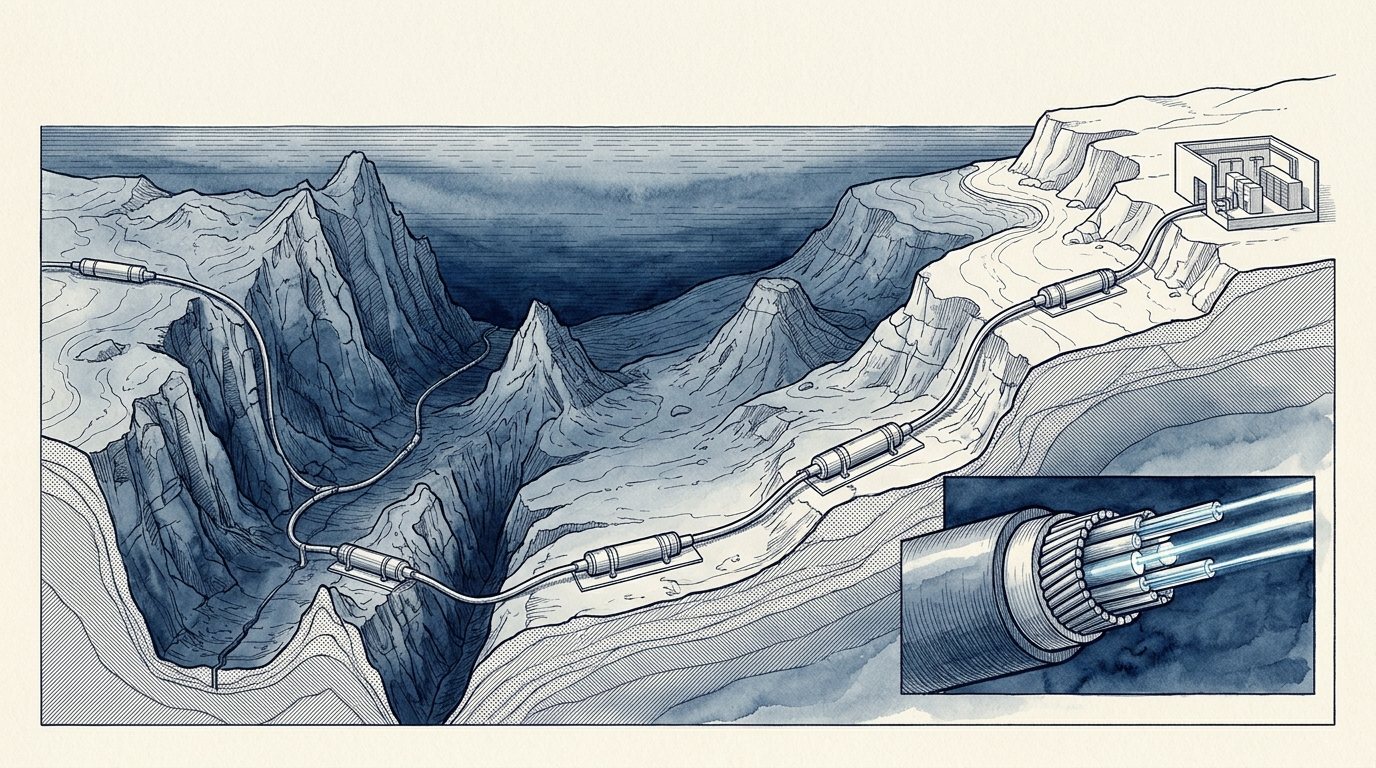
The internet is arguably the greatest collective achievement of computer and communication engineering. It transformed the globe into a borderless, interconnected network.
To understand the internet, we must first understand what a Computer Network is. When you want to share information between two computers, you can connect them with a cable. But imagine an office with 100 computers: * Connecting them in a daisy chain means if one machine fails, the rest of the chain disconnects. * Connecting all 100 machines to a single shared bus wire causes data collisions whenever two computers speak simultaneously. * Wiring every computer directly to every other computer (Full Mesh) would require 4,950 separate cables—a physical impossibility:
The solution is Star Topology: every computer connects to a central intelligent device called a Switch or Router. The router assigns each device a local numerical address—an IP Address (like 192.168.1.10). When Computer A sends data to Computer B, it sends packets to the router, which reads the destination IP in the header and routes it cleanly to Computer B.
In the 1960s, the US Defense Advanced Research Projects Agency (DARPA) created ARPANET, linking computers across research universities. Later, Vint Cerf and Bob Kahn created the TCP/IP protocol suite, establishing the universal rules that govern how data travels across interconnected networks worldwide.
Many people assume the internet lives in the sky, broadcast by satellites. The physical reality is that over 99% of global transcontinental internet traffic travels through fiber-optic submarine cables resting on the ocean floor. Satellites suffer from high latency and weather interference. Instead, submarine cables scarcely thicker than a garden hose, carrying glass strands that pulse with laser light, span thousands of kilometers across the Atlantic, Pacific, and Indian Oceans, connecting regional networks into one planetary grid.
The World Wide Web (WWW) and Website Architecture
In 1989, British computer scientist Tim Berners-Lee at CERN developed the World Wide Web (WWW). While people often use "Internet" and "Web" interchangeably, they are distinct: The Internet:* is the physical infrastructure—the roads, cables, fiber optics, and routers. The Web:* is a service running on top of that infrastructure—a linked system of documents, web pages, and multimedia accessed via web browsers using the HTTP protocol.
Web Browsers
To explore the web, we use Web Browsers (Chrome, Firefox, Safari, Edge). The browser acts as a translator: it requests raw code from servers across the internet and renders it into visual, interactive pages.
Front-End vs. Back-End
"google.com" → 142.250.x.x in milliseconds
SYN → SYN-ACK → ACK: Reliable connection established
Certificate verified + session keys. Data encrypted.
GET /index.html + headers sent to server
NGINX → App server → Database → 200 OK HTML payload
DOM → CSSOM → Layout → Paint → Composite
HTTPS = HTTP + TLS 1.3. AES-256-GCM encrypts every packet. CA certificate confirms domain identity.
Every website is split into two halves: 1. Front-End (Client Side): Everything you see on your screen. It is constructed using: HTML:* The structural skeleton that defines headings, text, buttons, and layouts. CSS:* The styling, typography, colors, and responsive visual design. JavaScript:* The dynamic behavior and logic running directly inside your browser. 2. Back-End (Server Side): The hidden engine running on remote servers. For example, on Facebook, the buttons and layout are front-end; but feed recommendation algorithms, user authentication, database queries, and notifications are processed by back-end servers and databases.
Domain Names, Hosting, and DNS
When you create a website, you host its files on a continuously connected Server. To help humans find your site without memorizing arbitrary numerical IP addresses (like 157.240.229.35), we use human-friendly Domain Names (like google.com). When you type a URL into your browser, the Domain Name System (DNS) acts like a global phonebook, instantly looking up the server's numerical IP address so your browser can connect.
Internet of Things (IoT): The Connected World and Smart Devices
The Internet of Things (IoT) represents the vision of digitizing everyday physical objects and connecting them to the internet: home lighting, refrigerators, air conditioners, agricultural soil sensors, and medical monitors. In a smart home, sensors can detect your arrival, adjust the room temperature, and illuminate the lights automatically. In agriculture, soil sensors can measure moisture levels and trigger automated irrigation systems. IoT connects the physical world into an automated, responsive digital ecosystem.
Light and Shadow: Digital Hygiene and the Responsibility of a Netizen
Like any revolutionary invention in human history, computers and the internet have an extraordinarily bright side, but they also cast a dark shadow.
On the bright side, education has been democratized through virtual classrooms, open-source libraries, digital archives, and online universities. A student anywhere in the world can study from the best educational resources humanity has produced. Healthcare, scientific research, and commerce have reached unprecedented heights.
Yet we must also recognize the perils. Social media platforms were initially designed to connect people; today, they are frequently engineered into algorithmic dopamine loops that harvest attention for advertisement revenue. Endless mindless scrolling fragments human concentration and isolates individuals. Misinformation, rumors, cyberbullying, hate speech, and unverified content pollute online spaces. Furthermore, ignorance makes users vulnerable to identity theft, phishing scams, and privacy breaches.
As a Netizen (a citizen of the internet), protecting your digital privacy and exercising discernment are paramount responsibilities. We must always remember to use technology as an instrument of empowerment, self-education, and authentic human progress—never for destruction or passive distraction. In this modern information era, we must not be left behind; we must reject shallow trends and use technology to elevate our lives, our communities, and our nation.

Discussion & Peer Review
Questions, empirical pushbacks, and architecture discussions.
No published discussion threads yet.
Be the first to challenge a premise or start an inquiry.